
Издательство MDPI: разбор LaTeX-шаблона для подготовки статьи
Как начать работу?
- Войдите в личный кабинет онлайн-редактора Labkeeper.
- Создайте проект из шаблона.
- Начните подготовку: слева — исходный код LaTeX, справа — окно просмотра PDF.
Описание шаблона научной статьи с примерами
Преамбула и выбор журнала
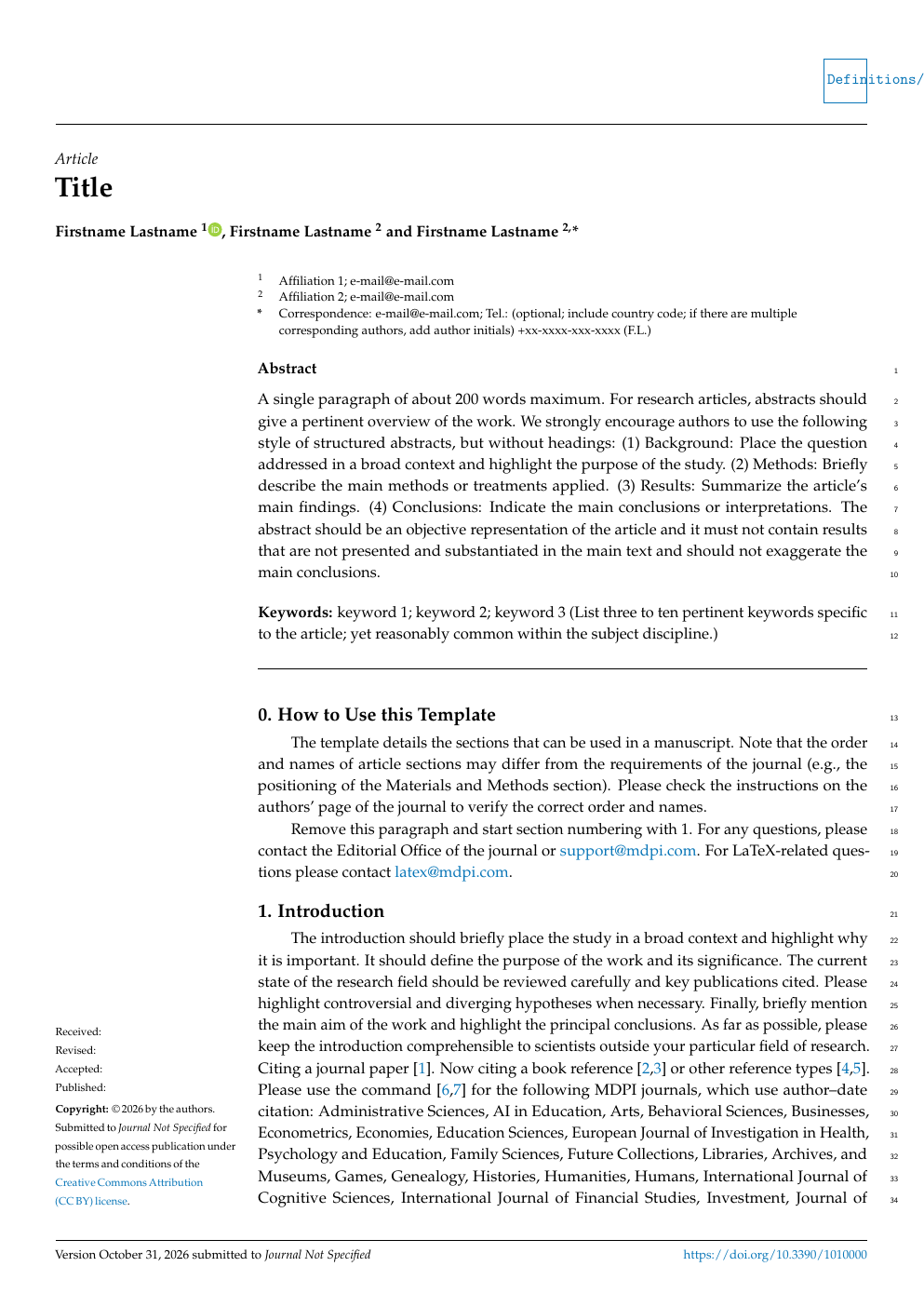
Самая первая строка шаблона (файла template.tex) определяет стиль отображения документа:
\documentclass[journal,article,submit,moreauthors]{Definitions/mdpi}
%\documentclass[preprints,article,accept,moreauthors]{Definitions/mdpi}
%\documentclass[preprints,article,submit,oneauthor]{Definitions/mdpi}journal— заменяется на короткий код нужного издания MDPI;article— указывается тип рукописи;submit— отображает макет для этапа рецензирования, после принятия укажитеaccept;moreauthors— замените наoneauthor, если вы единственный автор.
Название и ORCID
% Full title of the paper (Capitalized)
\Title{Title}

% Author Orchid ID: enter ID or remove command
\newcommand{\orcidauthorA}{0000-0000-0000-000X} % Add \orcidA{} behind the author's name
%\newcommand{\orcidauthorB}{0000-0000-0000-000X} % Add \orcidB{} behind the author's name
Авторы и аффилиация
% Authors, for the paper (add full first names)
\Author{Firstname Lastname $^{1}$\orcidA{}, Firstname Lastname $^{2}$ and Firstname Lastname $^{2,}$*}

%\longauthorlist{yes}

% MDPI internal command: Authors, for metadata in PDF
\AuthorNames{Firstname Lastname, Firstname Lastname and Firstname Lastname}

%\longauthorlist{yes}

% Affiliations / Addresses (Add [1] after \address if there is only one affiliation.)
\address{%
$^{1}$ \quad Affiliation 1; e-mail@e-mail.com\\
$^{2}$ \quad Affiliation 2; e-mail@e-mail.com}

% Contact information of the corresponding author
\corres{Correspondence: e-mail@e-mail.com; Tel.: (optional; include country code; if there are multiple corresponding authors, add author initials) +xx-xxxx-xxx-xxxx (F.L.)}
Аннотация и ключевые слова
% Abstract (Do not insert blank lines, i.e. \\)
\abstract{A single paragraph of about 200 words maximum. For research articles, abstracts should give a pertinent overview of the work. We strongly encourage authors to use the following style of structured abstracts, but without headings: (1) Background: Place the question addressed in a broad context and highlight the purpose of the study. (2) Methods: Briefly describe the main methods or treatments applied. (3) Results: Summarize the article's main findings. (4) Conclusions: Indicate the main conclusions or interpretations. The abstract should be an objective representation of the article and it must not contain results that are not presented and substantiated in the main text and should not exaggerate the main~conclusions.}

% Keywords
\keyword{keyword 1; keyword 2; keyword 3 (List three to ten pertinent keywords specific to the article; yet reasonably common within the subject discipline.)}
Перед началом редактирования удалите строку:
\setcounter{section}{-1} %% Remove this when starting to work on the template.Разделы и подразделы с капитализацией
\subsection{Subsection}
\subsubsection{Subsubsection}\newcommand{\orcidauthorA}{0000-0000-0000-000X}Списки
Bulleted lists look like this:
\begin{itemize}
\item	First bullet;
\item	Second bullet;
\item	Third bullet.
\end{itemize}

Numbered lists can be added as follows:
\begin{enumerate}
\item	First item;
\item	Second item;
\item	Third item.
\end{enumerate}
Формулы
\begin{equation}
a = 1,
\end{equation}

%\isPreprints{}{% This command is only used for ``preprints''.
\begin{adjustwidth}{-\extralength}{0cm}
%} % If the paper is ``preprints'', please uncomment this parenthesis.
\begin{equation}
a = b + c + d + e + f + g + h + i + j + k + l + m + n + o + p + q + r + s + t + u + v + w + x + y + z
\end{equation}
%\isPreprints{}{% This command is only used for ``preprints''.
\end{adjustwidth}
%} % If the paper is ``preprints'', please uncomment this parenthesis.
Рисунки
\begin{figure}[H]
%\isPreprints{\centering}{} % Only used for preprints
\includegraphics[width=8.0 cm]{Definitions/logo-mdpi}
\caption{This is a figure. Schemes follow the same formatting.\label{fig1}}
\end{figure}
\unskip
Таблицы
\begin{table}[H]
%\small % Change table font size
\caption{This is a table caption. Tables should be placed in the main text near the first time they are~cited.\label{tab1}}
%\isPreprints{\centering}{} % Only used for preprints
\begin{tabularx}{\textwidth}{CCC}
\toprule
\textbf{Title 1}	& \textbf{Title 2}	& \textbf{Title 3}\\
\midrule
Entry 1		& Data			& Data\\
Entry 2		& Data			& Data \textsuperscript{1}\\
\bottomrule
\end{tabularx}

\noindent{\footnotesize{\textsuperscript{1} Tables may have a footer.}}
\end{table}
Декларации
\authorcontributions{}
\funding{}
\institutionalreview{}
\informedconsent{}
\dataavailability{}
\durcstatement{}
\publicinvolvement{}
\acknowledgments{}
\conflictsofinterest{}
Библиография и ссылка в тексте
Раздел литературы имеет строгую структуру. Различные типы ссылок оформляются определенным образом.
MDPI использует три стиля оформления библиографических ссылок:
- ACS;
- Chicago (для кодов журналов arts, genealogy, histories, humanities, laws, literature, religions, risks, socsci);
- APA (для кодов журналов admsci, aieduc, behavsci, businesses, econometrics, economies, education, ejihpe, famsci, games, humans, ijcs, ijfs, investment, fclam, jintelligence, journalmedia, jrfm, jsam, languages, opermanag, peacestud, pmh, psycholint, publications, tourismhosp, youth).
Вам следует ознакомиться с инструкциями на странице для авторов журнала, чтобы узнать, какой из них подходит для подготовки статьи.
%=====================================
% References, variant A: external bibliography
%=====================================
% \bibliography{your_external_BibTeX_file}

%=====================================
% References, variant B: internal bibliography
%=====================================
Пример списка библиографии (variant B) в формате ACS
% ACS format
\isAPAandChicago{}{%
\begin{thebibliography}{999}
% Reference 1
\bibitem[Author1(year)]{ref-journal}
Author~1, T. The title of the cited article. {\em Journal Abbreviation} {\bf 2008}, {\em 10}, 142--149.
% Reference 2
\bibitem[Author2(year)]{ref-book1}
Author~1, L. The title of the cited contribution. In {\em The Book Title}; Editor 1, F., Editor 2, A., Eds.; Publishing House: City, Country, 2007; pp. 32--58.
% Reference 3
\bibitem[Author3 and Author4 (year)]{ref-book2}
Author 1, A.; Author 2, B. \textit{Book Title}, 3rd ed.; Publisher: Publisher Location, Country, 2008; pp. 154--196.
% Reference 4
\bibitem[Author5 and Author6(year)]{ref-unpublish}
Author 1, A.B.; Author 2, C. Title of Unpublished Work. \textit{Abbreviated Journal Name} year, \textit{phrase indicating stage of publication (submitted; accepted; in press)}.
% Reference 5
\bibitem[Author7(year)]{ref-url}
Title of Site. Available online: URL (accessed on Day Month Year).
% Reference 6
\bibitem[Author8 et al.(year)]{ref-proceeding}
Author 1, A.B.; Author 2, C.D.; Author 3, E.F. Title of presentation. In Proceedings of the Name of the Conference, Location of Conference, Country, Date of Conference (Day Month Year); Abstract Number (optional), Pagination (optional).
% Reference 7
\bibitem[Author9(year)]{ref-thesis}
Author 1, A.B. Title of Thesis. Level of Thesis, Degree-Granting University, Location of University, Date of Completion.
\end{thebibliography}
}
Компиляция и проверка
Нажмите кнопку компиляции в интерфейсе Labkeeper. Встроенный компилятор соберет документ и отобразит PDF-файл в окне предпросмотра.
В Labkeeper встроены инструменты искусственного интеллекта, которые помогают находить и исправлять ошибки верстки за один клик прямо в интерфейсе редактора. Используйте встроенного AI-агента для исправления ошибок.
Отправка статьи в редакцию журнала
Скачайте проект и отправьте в редакцию согласно разделу «Руководство для авторов» на сайте издательства MDPI.
Ссылка на актуальный шаблон статьи
Используйте готовый актуальный шаблон для издательства MDPI.
Открыть шаблон научной статьи для издательства MDPI в онлайн-редакторе Labkeeper.